
Vietnamese and Chinese on one Mac keyboard.
ViPi puts Telex and Pinyin in one small menu-bar app. Press ⌃ ⇧ to change language. Free, open source, and it never goes online except to check for updates.
Latest version, macOS 13 or later, Apple silicon and Intel. Notarized by Apple.
Click and type. Telex in VI, pinyin in 拼. ⌃ ⇧ switches, or pick a language above.
Telex that keeps up with you
The UniKey Telex you already know, with spell checking that knows every real Vietnamese syllable.
- tieengs Vieetj
- tiếng Việtaa aw ee oo ow uw dd, tones with s f r x j
- tosan
- toánPut the tone key anywhere in the word.
- ass
- asPress a key twice to take the mark back.
- user data class
- user data classEnglish words come back exactly as you typed them.
- vn Space
- Việt NamYour own text shortcuts. VN gives VIỆT NAM.
- Classic hòa or modern hoà tone placement.
- Spell checking on or off.
- Tested on a real Mac with all 8,329 valid syllables at 8 to 12 ms per key, and in Chrome at 3 ms per key, without losing a key or a mark.
Pinyin with a real candidate window
Candidates appear at the cursor. Whole sentences convert at once, each word chosen from the one before it.


- nihao
- 你好Full pinyin, v for ü.
- nh
- 你好Initials only.
- nih
- 你好Leave the last syllable unfinished.
- wozaixuexi
- 我在学习A whole sentence in one go, with 在 rather than 再 from context.
- xi'an
- 西安An apostrophe splits syllables.
1–9 or Space picks a candidate. ← → move, - = or ↑ ↓ turn the page. Enter types the raw pinyin and Esc cancels. Punctuation is full width: ,。?!
Learns from you
The words and phrases you pick come first next time. They are stored only on your Mac and clear with one click.
Fuzzy pinyin
z/zh c/ch s/sh n/l f/h l/r an/ang en/eng in/ing, each one optional, so zongguo still finds 中国.
Simplified or Traditional
One switch turns 头发 into 頭髮 and 后天 into 後天, phrase by phrase.
One shortcut for every language
Like ⌘ Tab, but for languages. Prefer ⌥ ⇧ or ⌃ Space? Change it in Settings.
Press once to go back to the language you used last.
Press twice quickly for the one before that.
- VI
- 拼
- EN
When typing stops, ViPi tells you why
A password field or a terminal can turn on macOS Secure Input, and every input method goes silent. ViPi's menu-bar icon turns into a lock and names the app holding it.
Secure Input is ON — typing is blocked
Held by Terminal (PID 812) · com.apple.Terminal
Since 09:41:07
Close that field or quit the app, and typing comes back. The window keeps a history with the time, app and path of every change.
Settings that fit on one screen
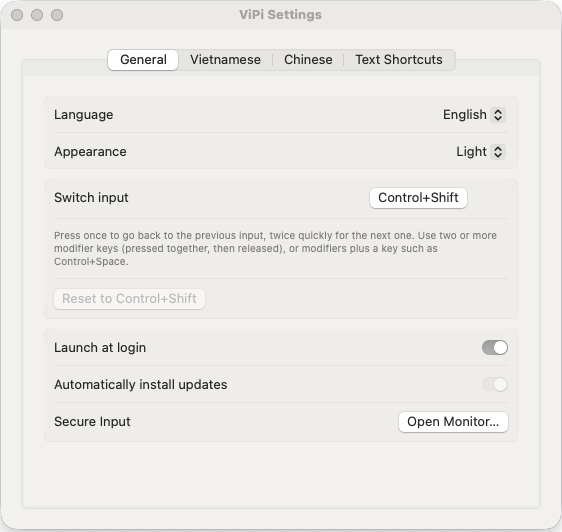
- The interface speaks English, Tiếng Việt and 简体中文.
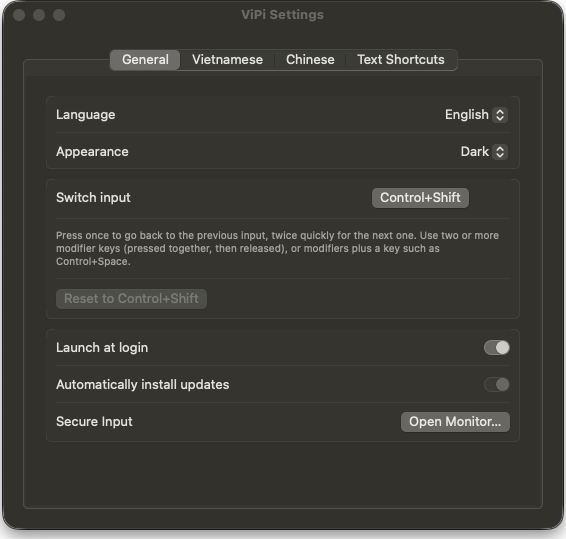
- Light or dark, following macOS or your choice.
- Updates itself: it checks GitHub, verifies the download is signed by the ViPi developer, and relaunches when you stop typing.
- Starts at login and stays in the menu bar.
What you will not find
- No price. Free forever under GPL-3.0. There is no Pro version.
- No tracking. Keystrokes are processed on your Mac and never leave it. The only network request is the update check to GitHub.
- No ads, no account, no nagging.
- No warnings. ViPi is signed and notarized by Apple, so macOS opens it straight away and the Accessibility permission survives updates.
Set up in under a minute
- Download ViPi.dmg, open it and drag ViPi onto Applications.
- Open ViPi and allow it in System Settings, Privacy & Security, Accessibility. It starts working within two seconds.
- Press ⌃ ⇧ and type.
Turn off other Vietnamese input methods such as UniKey, EVKey or GoNhanh, and keep the plain ABC input source, so only ViPi changes what you type.
Questions
ViPi suddenly stopped typing in every app
Some app has turned on Secure Input: a password field, a terminal with Secure Keyboard Entry, or a password manager. The menu-bar icon shows a lock. Open Secure Input Monitor from the menu to see which app it is, then close that field or quit the app.
An English word came out as Vietnamese
Words that are also real Vietnamese syllables, such as of becoming ò, cannot be told apart automatically. Press the tone key twice (off gives of) or switch to English with ⌃ ⇧.
Do I have to uninstall UniKey, EVKey or GoNhanh?
No, just turn them off while you use ViPi. Two tools rewriting the same keystrokes fight each other.
Which Macs are supported?
macOS 13 Ventura or later, on Apple silicon and Intel.
Does ViPi send what I type anywhere?
No. Everything happens on your Mac. The learned Pinyin words stay in a file on your Mac, and the only request ViPi makes is the update check to GitHub.
How do I uninstall it?
Choose Quit ViPi from its menu, then drag ViPi from Applications to the Trash.